

Here you’ll find everything you need to build effects for the Easy Spin — whether you want to load a ready-made patch and go play, sketch a new effect as a block diagram, or hand-write your own patch in assembly.
All of it is free to use. It’s built around the Easy Spin, our programmable pedal based on the Spin Semiconductor FV-1. The toolchain can also output standard .hex files for any FV-1 board.
Whichever option you choose, you’ll be part of a community of enthusiasts that have developed a wide range of FV-1 patches.
Getting started
I want great sounds without programming: Browse our patch library in the Easy Spin web tool, load eight patches into your pedal and go play. Start here →
I want to design my own effects: Draw a block diagram, or describe what you want to an AI agent that builds and validates it for you. Start here →
I want full control: Write in FV-1 assembly with syntax highlighting, a simulator, an oscilloscope and full debugging. Start here →
All environments support the Easy Spin simulator so you can easily audition a patch on virtual hardware before programming it to your pedal.
Jump to: Load patches · Build with blocks · Write assembly · Community
For players: load patches, no programming
Your Easy Spin holds eight programs at once. Swapping them takes a couple of minutes, so you can build one bank for a cover set and another for jamming at home.

Our web tool runs in your browser — nothing to install. Browse the full patch library, hear each effect before you commit, drag your eight favourites into the slots and program the pedal over USB.
Our patch library covers reverbs, delays, choruses, pitch shifting, distortion and more, with new ones added regularly.
Playing covers? A single bank can hold a hall reverb, a slapback, a chorus, a pitch-shifted octave, a tremolo and a distortion. That's most of a set list's worth of effects from one easy-to-use pedal!
For sound designers: build effects without programming
You know what you want to hear. You shouldn't need to learn DSP programming in assembly to get what you want.
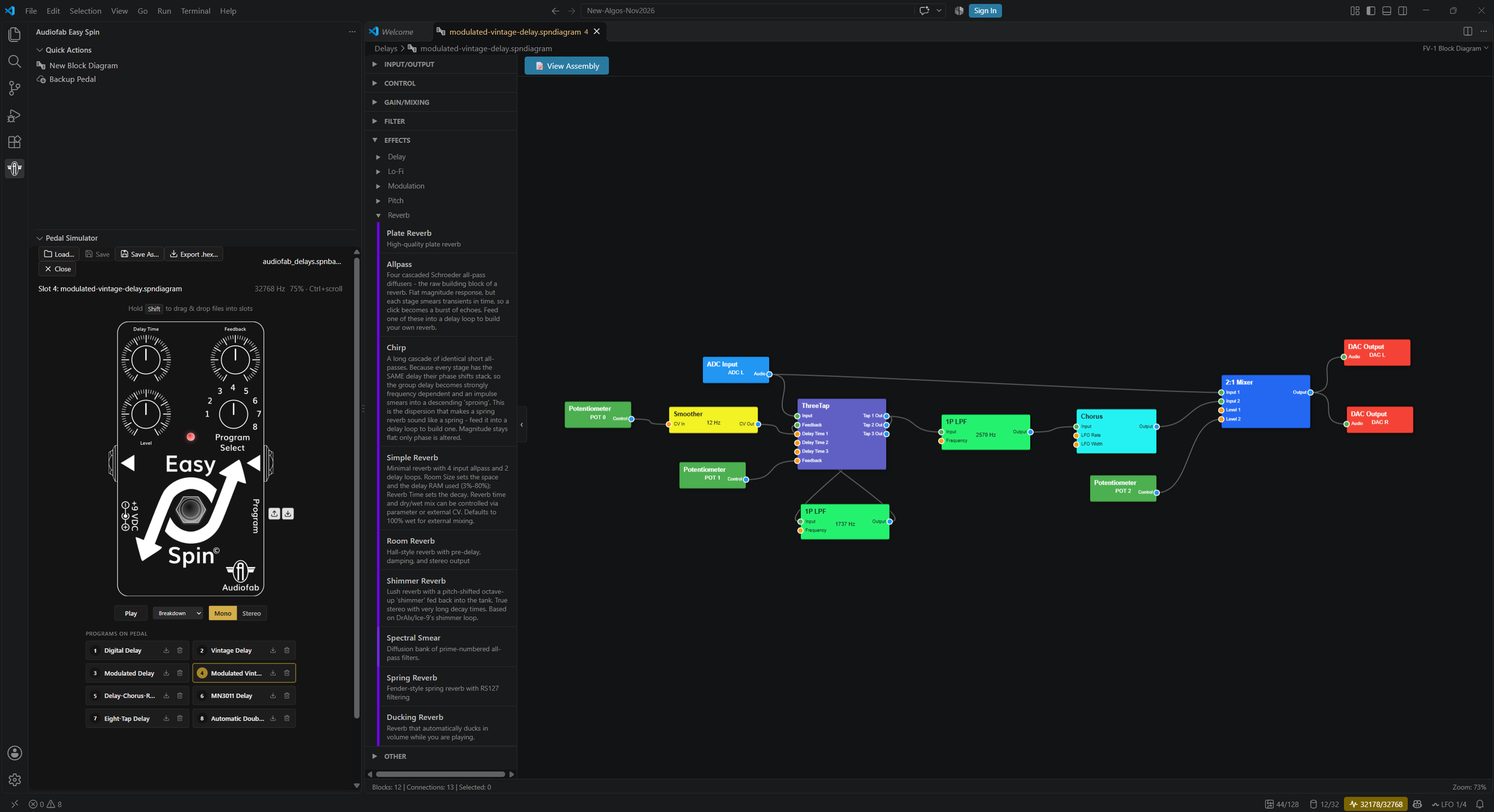
Audiofab FV-1 VS Code Extension
Visual block diagram editor
Drag blocks onto a canvas, wire them together, set parameters. The extension compiles your diagram into real FV-1 assembly — you can read the generated code if you're curious.
Live resource indicators show how much of the FV-1 you've used as you build, so you find out you've run out of delay memory while you're drawing, not after you flash the chip.
Block editor guide → · Worked example: a simple reverb →
AI Patch Builder
Describe the effect you want in plain language and let an AI agent build it.
The extension ships an MCP server that gives GitHub Copilot or Claude Code full knowledge of the block library and the block-diagram compiler. The agent drafts a patch, compiles it against the real compiler, reads the errors, fixes them, and repeats until it's correct — so what you get back is validated against the FV-1's actual limits (128 instructions, 32 registers, 32768 words of delay memory), not guessed at.
If no existing block does the job, the agent can write a new one in the Audiofab Template Language and use it immediately.
Things people ask it for:
Create a new .spndiagram for a stereo hall reverb with a short pre-delay. Validate it, then save it as reverb.spndiagram.
Here's a screenshot of a SpinCAD patch — recreate it as a block diagram.
Build a lo-fi vibrato. If no block does what you need, author a custom one. Validate before saving.
Needs VS Code 1.101+ and either GitHub Copilot in agent mode or Claude Code.
Whatever the agent produces opens in the block editor, so you can adjust it by hand and audition it in the simulator.
For developers: assembler, simulator, debugger
Full FV-1 assembly development in VS Code.
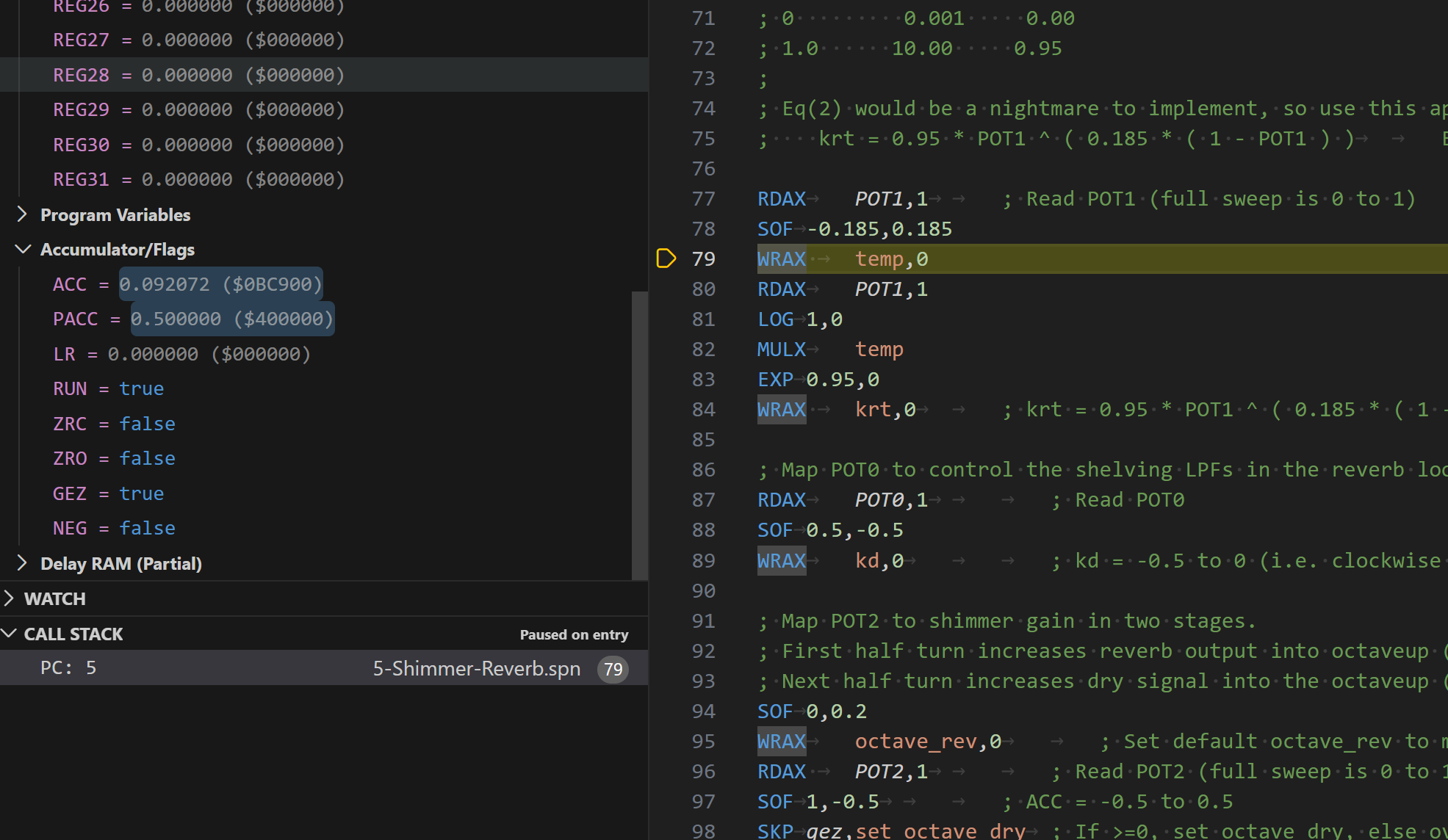
Editing — syntax highlighting for .spn files and .hex output for any FV-1 hardware.
Pedal simulator — an interactive, virtual Easy Spin. Feed it the built-in test audio or your own WAV files, drag POT0/1/2 in real time, click the footswitch to check your bypass behaviour. It doubles as the bank editor: drop .spn or .spndiagram files into the eight slots and flash them together.
Debugger — set breakpoints in assembly, step instruction by instruction, with full visibility of all 32 registers, the accumulator and the LFOs while paused.
Multi-trace oscilloscope with logarithmic zoom from 1 ms to 1 s, watching the accumulator, hardware pots and internal registers at once.
Spectrogram view for the frequency domain.
Live map of the 32k-word delay RAM showing read/write pointers and how your program is using memory.
Writing custom blocks — the Audiofab Template Language lets you build reusable blocks for the visual editor, with JSON metadata defining ports and parameters. Good ones we'll happily take as contributions.
Documentation → · Install → · GitHub → · Block developer guide →
Community and further reading
FV-1 program archive — a large collection of community patches, and the best place to look when you want something we haven't written.
Spin Semiconductor — the FV-1 datasheet, instruction set reference and application notes. The primary source for how the chip works.
SpinCAD Designer — the long-standing open-source block-based FV-1 designer. If you have existing SpinCAD patches, the AI Patch Builder can help recreate them.
Audiofab YouTube channel — walkthroughs of both the web tool and the VS Code extension.
Found a bug or want a feature? Open an issue on GitHub.